Review Comments (2) Screenshots (15) Questions & Answers (0) Votes (82) Awards (18) Wiki  
(82)
4.2.1.1745
www.flashfxp.com
Shareware
14 485 people
Download FlashFXP

3.41 MBDownloaded 3683 times

This software was checked for viruses and was found to contain no viruses.
Click here to see antivirus report.
 
Video tutorial for FlashFXP 4.1
Frame

Review

This is official description

Use FlashFXP to publish and maintain your website. Upload and download files, such as documents, photos, videos, music and more.FlashFXP offers unique and complimentary advanced features for client configuration. Share files with your friends and co-workers (FTP or SFTP server required)
 
The following review written by one of the Software Informer contributors applies to version 3.7

FlashFXP is the program of choice for webmasters who want to manage their websites' remote files and directory. The program is my favorite FTP client for its low memory footprints and noticeable file transfer speed compared to alternative products.

The program has the ability to connect from behind firewalls in the passive mode. You can build and schedule file downloads and uploads. The program supports resuming broken file transfers and shows the estimated remaining time and transfer speed. The site manager feature of the program enables you to save the FTP login details of your favorite FTP servers. Moreover, the quick connect panel allows you to copy and paste FTP URLs for immediate access.

The program has built-in tools that enable you to compare two files, monitor the system clipboard, edit text files and perform other tasks. The program allows you to protect it with a password, but its encryption system is poor and there are many password crackers for this program.

FlashFXP 3.7 has been introduced with few new features: library upgrades and bug fixes. The most important feature introduced in this release is the support for Secure File Transfer Protocol (SFTP) which enables server owners and webmasters to manage their files and directory in a more secure environment.
  • SFTP support.
  • Low memory footprints.
  • None.

Reviewer rating:

Reviewed: 2 years ago

What's new in version 4.2

Improved [ftp] folder path name handling when performing operations on the server, specifically when the folder name changes as a result of the FTP server. A folder named "test" may be entered by the user but the server might name the folder as "TEST".
Improved UNIX:L8 directory list parser to better handle directory listings where the group or owner field contains a space.
Improved internal image-list stream loading/saving. A compatibility issue in the old method could cause FlashFXP to crash immediately on start-up on some operating systems.
Improved and updated the theme manager component. The update addresses an issue found in the original theme manager that failed to insure the window handle for the sub-classed component was valid, If the handle was invalid it could cause FlashFXP crash.
Improved threaded timer callback routines, Some rare situations could trigger a race condition which could cause FlashFXP to crash.
Improved performance of the server file search and calculate disk space features by replacing the lookup list container with a faster hash lookup list container.
Upgraded OpenSSL to v1.0.1.
Improved compatibility with PS3 FTP Server/multiMAN, The MLST command unexpectedly returns multiple non-matching entries causing a conflict when evaluating the file transfer rules.
Improved [server compatibility] We now attempt to detect "mTCP FTP server" and "PS3 FTP Server" during login, when detected FlashFXP will issue the standard LIST command without any parameters.
Improved [server compatibility] We now attempt to login with ANSI and/or UTF8 encoded username and password on login failure, some FTP servers require UTF8 while others require ANSI with no way to determine.
Bug Fixes
Fixed [remote/tree navigation] an issue where the cached overlay icon displayed on the tree navigation wasn't removed after uploading files into the folder.
Fixed [connection/retry] There was a very small chance of a race condition when aborting the connection attempt that could result in FlashFXP locking up.
Fixed: [local browser/sorting] In some situations the sort comparison was comparing the wrong data.
Fixed: [sftp] The connection lost status message was reporting the wrong idle time.
Fixed: [download/upload] On write failure the file stream object was freed twice which could lead to memory corruption.
Fixed: [application/event timer] When closing FlashFXP the event thread could crash as a result of the owner being freed before the thread loop exited.
Fixed: [local browser/drop-down box] Unable to insert a line. error, the drop-down list failed to clear the entries on close up eventually running out of space.
Fixed: [remote edit / auto upload] In some cases FlashFXP didn't detect when the local file was saved.
Fixed: [remote edit / legacy prompt] When using legacy prompt mode and opening the file in the internal text editor the upload prompt would appear on top of the internal editor preventing the file from being edited.
Fixed: [remote browser / rename] Under some conditions performing a rename didn't set the browser state to busy, allowing the user to perform unsafe operations while in the middle of performing the rename operation.
Fixed: [remote browser / delete] Under some conditions delete was incorrectly disabled and prevented the user from performing the operation.
Fixed: [application] A performance bottleneck in the main application message loop resulted in a wide range of issues, non-ssl ftp downloads were being throttled, audio stuttering (text-to-speech) when using NVDA screen-reader, were a couple of the main issues noticed.
Fixed: [server/set file attributes dialog] Incorrect tab order when pressing the tab key to switch focus to the next control.
Fixed: [sftp/download] When disk write error occurred during download the file transfer wasn't stopped immediately.
Fixed: [server/download] A bug in the cache lookup system resulted in some upload file transfers being overwritten without prompting the user.
Fixed: [installer] The installer didn't always update existing language files and sometimes it installed languages that weren't installed.

What's new in version 4.1

- Major performance improvements throughout by reducing unnecessary overhead through code refactoring and performance profiling.
- Added native support for 32-bit alpha masks in the tool-bar buttons. With a fall back to the old blend mode when 32-bit is unavailable.
-We now use the Tango button style as default in FlashFXP, the original classic style is still available for customers.
- Improved compatibility with older versions of Windows.
- Specifically user interface related glitches when themes were unavailable or disabled.
- Improved error messages for SFTP, FTP, FTP-SSL, Socks4/5, HTTP Proxy, etc.
- Improved use of windows TaskDialog with a automatic fall back on failures.
- Improved WINE compatibility, This is the first release of FlashFXP that is 100% compatible with WINE.
- Improved FTP and SFTP protocol error handling, with additional fail safes to handle unexpected server responses.
- Improved SFTP transfer speeds. Uploads and downloads are much faster.
- Improved input controls and added control Backspace support.
- Improved tool-bars buttons by enabling or disabling them based on the current state.
- Improved remote SFTP and FTP directory refreshing, the item selection is preserved in-between refreshes.
- Improved the performance speed of the local file browser.
- Improved selective transfer rules.
- Improved performance speed of MODE Z file transfers (FTP protocol).
- Improved file handling when uploading or downloading to a slow device or network share.
- Added En-queue Delete/Rename support to the local browser right-click menu.
- Added 'Schedule At' under Queue on the main menu, previously this was only available via the queue window right-click menu.
- Added status message when the loaded translation is incomplete and a link to the translation editor.
- Added Remote edit history, when editing remote files the details for each edit is stored and then restored on connect, the temporary file is not kept locally, the file is re-downloaded for any edit.
- Added the ability to set the character encoding for SFTP site profiles.
- Added the ability to import sites from FileZilla.
- Added Ctrl W shortcut to toggle synchronized browsing on/off.
- Added support for connecting to domain names that resolve to multiple IP addresses, The first IP is tried, on connection failure the next is tried and so on.
- Added the ability to en-queue move operations.
- Added the ability to define optional file masks and exclude sub-folders within en-queued delete folder operations.
- Added $lowercase, $upercase, $uplowcase() macros to custom commands.
- Improved custom tool bar backgrounds.
- Improved auto-discover time offset feature.
- Improved interface scaling when Windows display scaling is active.
- Updated to OpenSSL 1.0.0e.

What's new in version 4.0

FTP, FTPS, SFTP, FXP.
Secure SSL encryption.
Remote server file search.

What's new in version 3.7

v3.7.2.1266 Public Beta


Change History
* Version 1.0 To 2.0
* Version 2.0 To 3.0
* Version 3.0 To 3.2
* Version 3.2 To 3.4
* Version 3.4 To 3.6
* Version 3.6 To 3.8


New Features
* SFTP Support.
* Added the ability to replace a client certificate, replacing the certificate assigns the new certificate to all the sites the previous certificate was assigned to.
* Added the ability to En-queue delete operations and raw commands. (Remote file list > Right click > EnQueue).
* Added History sub-menu to the connection dropdown menu list.
* Added an Option (Preferences > General > Options) "Include Quick Connect sites in History".
* Local folder sizes are pre-calculated prior to upload to help calculate a more accurate queue remaining time.
* Support for toolbar themes and custom button images.
* Added ability to add comments to a bug report directly from within FlashFXP.

Changes
* The chain of commands used for local synchronization when navigating via the listview has been reordered.
* Redesigned quick connect interface.
* Updated OpenSSL Dll's to 0.9.8h.

Fixes
* Toolbar malfunction on windows 2000.
* Abnormal window behavior when switching between FlashFXP and the Internal text editor.
* Saving the favorites.dat would generate a crash report when the permission to save the file was denied.
* Resolved a problem with handling MLSD directory listings that resulted in the fields being converted to lowercase.
* Many other minor fixes.

What's new in version 3.6

New Features
* Added 'Activate Synchronize Browsing on Connect' per-site option.
* Added -approvessl command line param, this is used for automation to always accept the SSL certifcate. Use with care.
* Added support for MLSD (machine formatted directory lists).
* Added support for UTF8 (iso-8859-1/Latin-1).
* Added parsing of host:port when pasting into the host field of the proxy dialog.
* Added drag/drop support between the local browser and external applications.
* Added Queue Parent of Selected to the right-click menu in the FTP Search Dialog.
* Added move to the right-click menu in the FTP File Search Dialog.
* Added new option "Only search within folders matching data range" to the Date tab of the FTP Search dialog.
* Added Details tab to the About box to display information reguarding your FlashFXP installation.
* On Windows XP and newer operating systems the file listing now uses a logical sort when alpha sorting. Sorting in FlashFXP should now match the Operating System's behavior.
* Double clicking on the SSL lock icon on the status bar will now show the SSL cert dialog.
Report a wrong version Report a wrong program title Suggest a correction

Screenshots

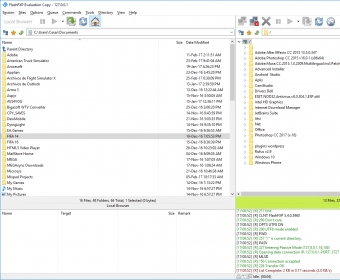
Main window Main window Main window Main window Main window Main window Main window Main window
All 15 screenshots

Latest comments

Guest #4003998(beginner) 2 years ago 
It's really really good
Reply
Natthapong Sansombat(beginner) 3 years ago 
I wouldn't say this is the best. But yet easiest to use.
Reply
Add new comment All 2 comments

E-mail Address:

Password:

Register now »

Forgot password?

Sign in with:
Facebook Account
.fqf FlashFXP Queue File
.ftp FlashFXP FTP Site File
Download Software Informer Client
Copyright © 2012, Informer Technologies, Inc. About| Terms & Privacy| FAQ| Feedback & Support| For Developers